# Notifications

Every time a cashout changes its status, we will send you an asynchronous notification containing the ID of the cashout by **POST** protocol in **x-www-form-urlencoded** format.

The webhooks are sent to:

1. &#x20;the **`notification_url`**  you sent in the request, or&#x20;
2. to the one you have configured under the section: ***Settings***  :arrow\_right: ***API Access*** :arrow\_right: ***Withdrawal URL.***

**Once received the notification, you should check its new status with the** <a href="https://app.gitbook.com/s/0lbPmhFPUb55BAkK3G6F/cashouts-api/manage-cashouts/get-a-cashout-status" class="button primary" data-icon="magnifying-glass">Get cashout status</a> **endpoint** **and update it on your end accordingly.**

{% hint style="success" %}

### Firewall configurations

Bear in mind we will only connect through ports 80 and 443. \
Make sure your **`notification_url`** has one of those ports open accepting connections from us.
{% endhint %}

#### Example notification

```http
    date=2020-03-12%2020%3A26%3A11
    &bank_reference_id=
    &comments=
    &external_id=cashoutV35381
    &control=A4CFF64E78C4BD01F8BFCA4AFF04632EC4A33CC61BD6BBD156BA1289897892EB
    &cashout_id=60067
    &status_reason=
```

<table><thead><tr><th width="170.609375"> Field</th><th width="240.640625">Format</th><th>Description</th></tr></thead><tbody><tr><td><code>date</code></td><td>Date. Format: YYYY-MM-DD HH:MM:SS (GMT)</td><td>Date the cashout changed its status</td></tr><tr><td><code>bank_reference_id</code></td><td>String (max. 50 chars)</td><td>Reference ID of the bank if any</td></tr><tr><td><code>comments</code></td><td>String (max. 200 chars)</td><td>Comments of the cashout if any</td></tr><tr><td><code>external_id</code></td><td>String (max. 100 chars)</td><td>ID of the cashout you sent while creating the request</td></tr><tr><td><code>control</code></td><td>String</td><td>Control signature of the notification</td></tr><tr><td><code>cashout_id</code></td><td>Number</td><td>ID of the cashout on our end</td></tr><tr><td><code>status_reason</code></td><td>String</td><td>Reason of the status if any</td></tr></tbody></table>

### Control String

The control string for the notifications is made up of some random characters at the beginning and the end of the request and the **`external_id`** received in the middle.

{% hint style="info" %}
The control string should be generated using your own secret key (API Signature) and must be in upper case.

Make sure you convert the message to hash to **UTF-8** to prevent errors.
{% endhint %}

Check the examples below on how to calculate the control string for the notifications:

{% tabs %}
{% tab title="JAVA" %}

```java
public static void main(String[] args) throws IOException, NoSuchAlgorithmException, InvalidKeyException {
      String external_id = "cashoutID1234";
      String message = "Be4" + external_id + "Bo7";
      String apiSignature = "your_cashout_api_signature";

      Mac hasher = Mac.getInstance("HmacSHA256");
      hasher.init(new SecretKeySpec(apiSignature.getBytes(StandardCharsets.UTF_8), "HmacSHA256"));
      byte[] result = hasher.doFinal(message.getBytes(StandardCharsets.UTF_8));

      System.out.println(StringUtils.upperCase(DatatypeConverter.printHexBinary(result)));
}
```

{% endtab %}

{% tab title="PHP" %}

```php
$external_id = 'cashoutID1234';
$message = 'Be4' . $external_id . 'Bo7';
$api_signature = 'cashout_api_signature';

$hash = strtoupper(hash_hmac('sha256', pack('A*', $message), pack('A*', $api_signature)));


```

{% endtab %}

{% tab title="C#" %}

```csharp
 string external_id = "cashoutID1234";
 string message = "Be4" + external_id + "Bo7";
 string apiSignature = "your_cashouts_api_signature";
 
 byte[] keyByte = new System.Text.Encoding.UTF8.GetBytes(apiSignature);
 byte[] messageBytes = new System.Text.Encoding.UTF8.GetBytes(message);
 byte[] hashmessage = new HMACSHA256(keyByte).ComputeHash(messageBytes);

 string control = BitConverter.ToString(hashmessage).Replace("-", "").ToUpper();
 
```

{% endtab %}
{% endtabs %}

### Testing notification in Staging

Receiving notifications accordingly is part of our [integration requirements checklist](https://apidocs.onekeypayments.com/guides/getting-started/start-testing#integration-checklist).

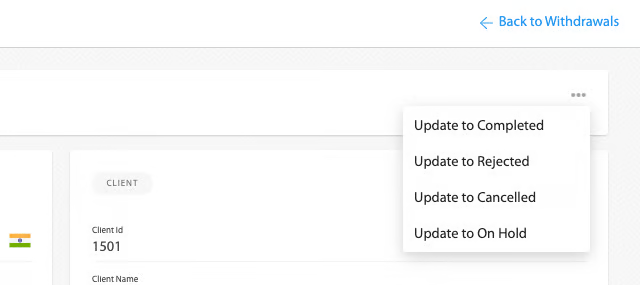
In the <mark style="color:$danger;background-color:red;">**Staging**</mark> environment, in order to test the full flow you can manually set a cashout to **COMPLETED,** **CANCELLED, REJECTED or ON HOLD** status by: Logging in into the [STG Merchant Panel](https://merchants-stg.onekeypayments.com/login)  :arrow\_right:  Transactions :arrow\_right: Withdrawals.

Those options will change the status of the deposit, therefore **sending the respective notification to your `notification_url` after a few minutes**.

<figure><img src="https://content.gitbook.com/content/NmmYRmGEpduaZ8YTyKQQ/blobs/eC6yhoAxOgHOxkeARx30/image.png" alt="" width="320"><figcaption></figcaption></figure>

### Retry logic

Every time a cashout changes its status, we will send you a notification so you can <a href="https://app.gitbook.com/s/0lbPmhFPUb55BAkK3G6F/cashouts-api/manage-cashouts/get-a-cashout-status" class="button primary" data-icon="magnifying-glass">Get cashout status</a> back.

In case that for some reason your server was unable to receive the notification and you returned an HTTP code different than 2XX, we will retry the notification up to 5 more times or until you respond with HTTP 2XX, whatever comes first.

{% hint style="success" %}
In case of errors while handling the notification, make sure you will answer with an HTTP code distinct than 2XX, that way we will retry the notification.
{% endhint %}

The time between the 5 notifications attempts will be of 5 minutes each.

When the notification failed to be sent, it will be shown like this in our Merchant Panel:

![](https://content.gitbook.com/content/NmmYRmGEpduaZ8YTyKQQ/blobs/vihvsf2Ct2YH5GfLCmLV/cashout_notifications_failed.png)

If you see the errors from the screenshot above, it means the cashout was successfully completed but suddenly we couldn't notify you. Keep reading to know how to resend the notifications.

### Resend Notifications

In case your system was unable to receive the notification in any of the 5 attempts, you can always check  its status with the <a href="https://app.gitbook.com/s/0lbPmhFPUb55BAkK3G6F/cashouts-api/manage-cashouts/get-a-cashout-status" class="button primary" data-icon="magnifying-glass">Get cashout status</a>

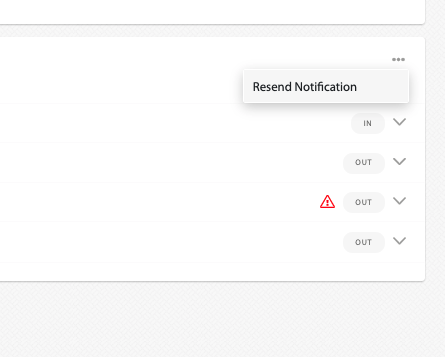
If you need to trigger the check status by receiving our notification, once the issue preventing you from receiving our notifications was fixed, you can go to the Merchant Panel, locate the cashout (Transactions :arrow\_right: Withdrawals) and click on the three dotted button under the <img src="https://content.gitbook.com/content/NmmYRmGEpduaZ8YTyKQQ/blobs/5CXilMsxqnmq5sKgZE4g/image.png" alt="" data-size="line"> section and then "**Resend notification**"  to force a new notification to be sent.:clock1: **It can take up to 2 minutes for the notification to be resent.**
![](https://content.gitbook.com/content/NmmYRmGEpduaZ8YTyKQQ/blobs/xsF3DRSBpMNhB6Japie4/Screen%20Shot%202021-09-23%20at%2013.35.29.png)

{% hint style="success" %}
:clock1: **It can take up to 2 minutes for the notification to be resent.**
{% endhint %}